![logotype_lanterna_education_blue (1).png]](https://support.lanterna.com/hs-fs/hubfs/logotype_lanterna_education_blue%20(1).png?height=40&name=logotype_lanterna_education_blue%20(1).png)
If you have completed your tuition with a student or the student has requested a tutor change in which case you would stop providing tuition to them, then you will need to mark this student as 'Inactive' on your Portal account.
You will be able to view all of your active and inactive students when you login to the Portal and click on 'My Students' on the left hand sidebar.

Please select which student you wish to remove from your active students list. You will then be able to see the 'Deactivate' button.
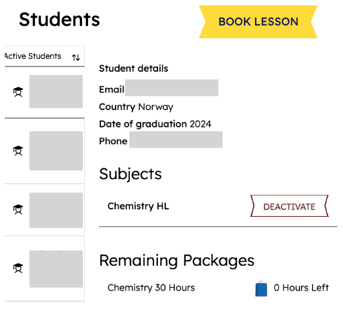
Simply click on 'Deactivate' and allow the page to refresh. After this the student should be in your 'Inactive' student list.